Public beta
TACK FM-1
A drum synth for the M-VAVE FM-1.
Seven synthesised voices and a step sequencer with parameter locks, Euclidean lanes, chance, recurrence, velocity shapes, and a direction and speed for each lane. It installs from the browser and sends 10 channels of USB audio.
01 / EXPLORE
Start here
Tack replaces the firmware of an M-VAVE FM-1 with a seven-voice drum synth and a step sequencer. It is a whole firmware, so the FM-1's own synth is gone while Tack is on it.
The voices, the FX and the sequencer come from the LXR firmware by Sonic Potions and Erica Synths, compiled for the FM-1's chip and extended. The panel and the screens are new. Tack is not made or endorsed by Erica Synths or M-VAVE.
A first pattern
- Install Tack from Chrome or Edge. Read the status section below first.
- Press HOME for the overview. One of the first seven black keys picks a voice.
- Press white keys to set steps on that voice, then press PLAY.
- Turn K1 to K4 for its pitch, filter, decay and volume.
- Hold a step and turn a dial to lock that value to the step.
- Stop, press SAVE to see what it will write, and press it again.
- Voices
- Three drums, a snare, a cymbal, and closed and open hats, each with its own synth parameters.
- Sequencer
- Seven lanes of up to 64 steps, each with its own length. Steps have velocity, nudge, flam, chance, recurrence and up to eight parameter locks.
- Patterns
- 16 patterns, chains that loop, and one song of up to 63 rows.
- USB
- Stereo or 10 channel audio, MIDI notes, and MIDI clock in.
- Kits
- 128 slots for kits in the LXR-02's
.SNDformat. None come with Tack.
02 / REFERENCE
Manual
Every key, page and mode.
Keys and buttons
- White keys
- The 16 steps of the bar showing, on release.
- Black keys 1 to 7
- Pick a voice and play it. With REC running they record it. With SEQ held they pick it silently, and with ARP held they mute it.
- Black key 8
- ROLL while held. The rate is on GLO.
- Black key 11
- COPY. Hold it and press a white key to copy this pattern onto that one.
- K1 to K4
- Whatever the screen shows above them.
- SELECT, ALGORITHM, PRESET
- Tempo, morph and kit. The tempo shows large in the header as it turns. With SEL held, SELECT is the shuffle, which is also on GLO. In the bars view and NOTE, SELECT walks the steps, and with SEL held it jumps a bar, and ALGORITHM nudges the selected one.
- OCT- and OCT+
- Bars 1 to 4. In NOTE they move the keys up to three octaves. On a sound page, hold one to bring its row onto the dials.
- HOME
- The overview, from anywhere.
- SEQ
- The last detail view, the bars view or NOTE. Tapped in one, the other. Hold it with a white key for a pattern.
- EDIT, ENV, LFO, FX, GLO, ARP
- Open a page. A second press moves to the page's next screen if it has one, and otherwise does nothing. ARP opens the selected lane.
- PLAY, REC
- Start and stop, and live recording.
- SAVE
- Opens the save page. A second press writes what it says. SEL and SAVE together write your changes at once.
Light on a voice key means: bright, the selected voice. Middle, this pattern has steps on it. Glow, an empty lane. Dark, muted. Each key flashes as its voice plays.
On a page, a line under a label marks each of K1 to K4, from left to right, and a dial with nothing to do there has none. On HOME the four dials are always K1 to K4. Hold SEL on its own for a second to list what it does on the current page.
The overview
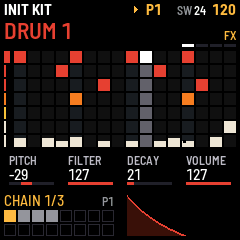
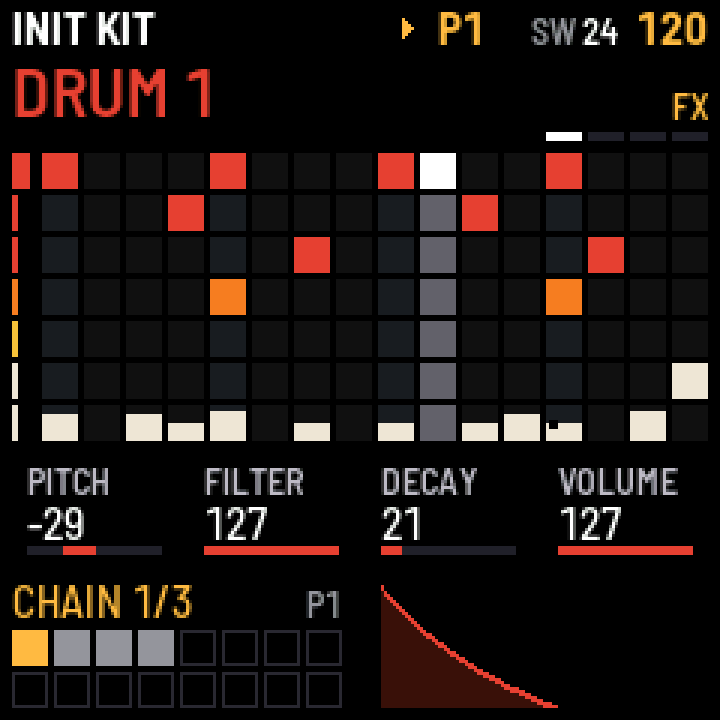
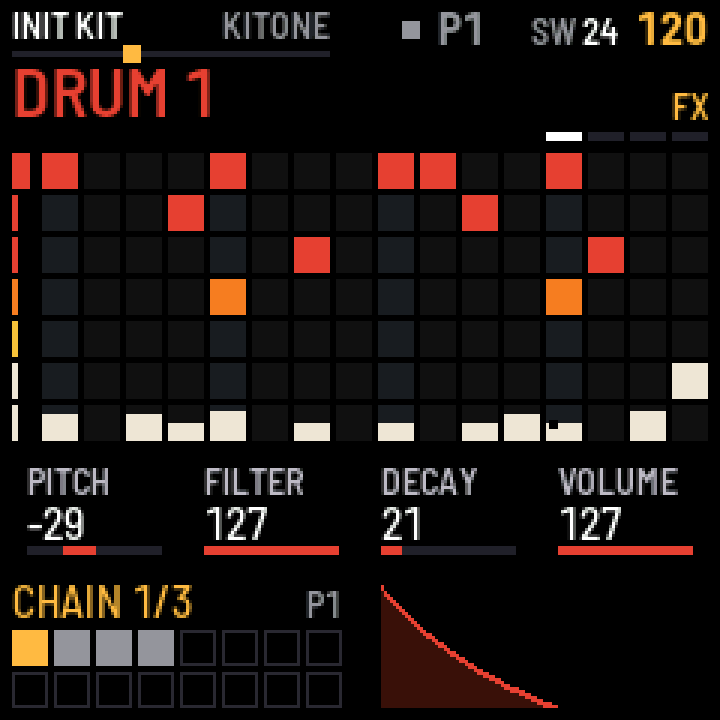
HOME shows all seven lanes with their lengths, playheads and mutes, and each step's height is its velocity. Below them are the selected voice's four main dials and its envelope. Above the grid are the transport, REC, SW and the shuffle amount when it isn't 0, and four marks just above the grid: white for the bar it shows, grey for the other bars in use, and dim for the room to add more. FX shows there if the voice goes to the FX.
Bottom left are the 16 patterns in the white keys' order: the one playing is lit, those with steps are grey, and the one queued has an outline. Above them is what's playing: PATTERN 1, or the row of the chain or song, such as CHAIN 1/3. To its right, NEXT 2 shows a queued pattern. The envelope is to their right, under the dials that shape it.
Steps and locks
Press a white key to set or clear a step. Hold a step to work on it. Once a dial turns, or after half a second held, the dials show the step's values, its locked ones lit, and on HOME the bottom shows the step: its passes, and its locks by name and value where the envelope was, those the four dials don't show first.
- K1 to K4
- Lock those values on the step, on the overview and the sound pages. A step holds eight locks. EDIT clears them.
- ALGORITHM
- Nudge, on a ruler, in 24ths of a step. It moves one 24th at a time up to 9, for small changes of feel, then 12, 15, 18 and 21 either way. At 120 BPM a 24th is about 5 ms.
- PRESET
- Chance.
- Black keys 1 to 8
PLAY ON PASS: the passes of the pattern the step plays on, eight of them, as a lane's steps. A new step plays on all eight. A key takes its pass out, and puts it back.- SELECT
- Shortens the cycle of passes, to as few as 2, as a lane's end does. Passes it gains play.
The bars view
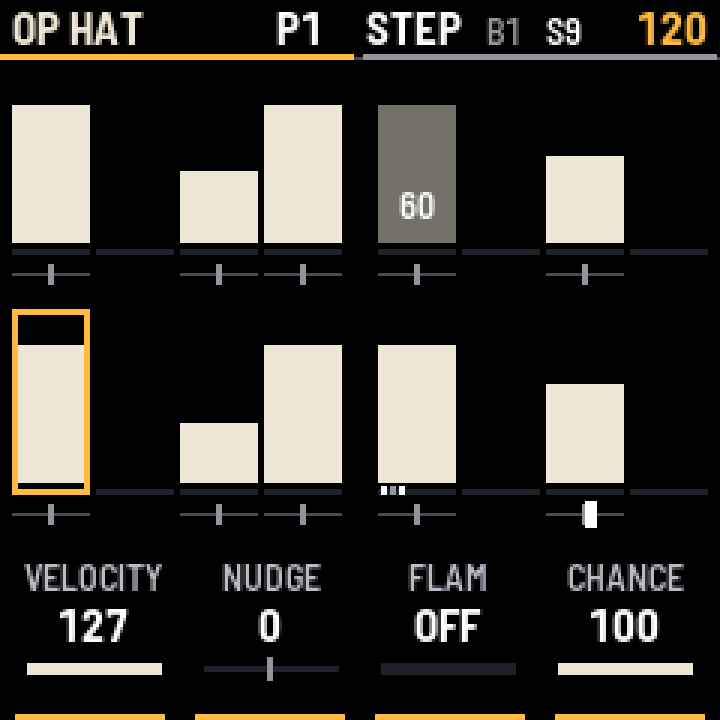
Press SEQ for one voice's bar at a larger size, in the white keys' order. Each step of the lane stands on a line, its height is velocity, and the ruler under it is its nudge. L2 counts its locks, boxes show recurrence, and chance and flam show as text.
A key, SEL or SELECT selects a step, and the top bar shows it as S3. K1 to K4 are then that step's velocity, nudge, flam and chance, with or without the key held. Nothing locks in this view, and it doesn't tune the sound. Use the overview for those.
CHN or SONG beside the voice's name means a chain or the song is picking the pattern, so the steps are whichever pattern is playing.
NOTE
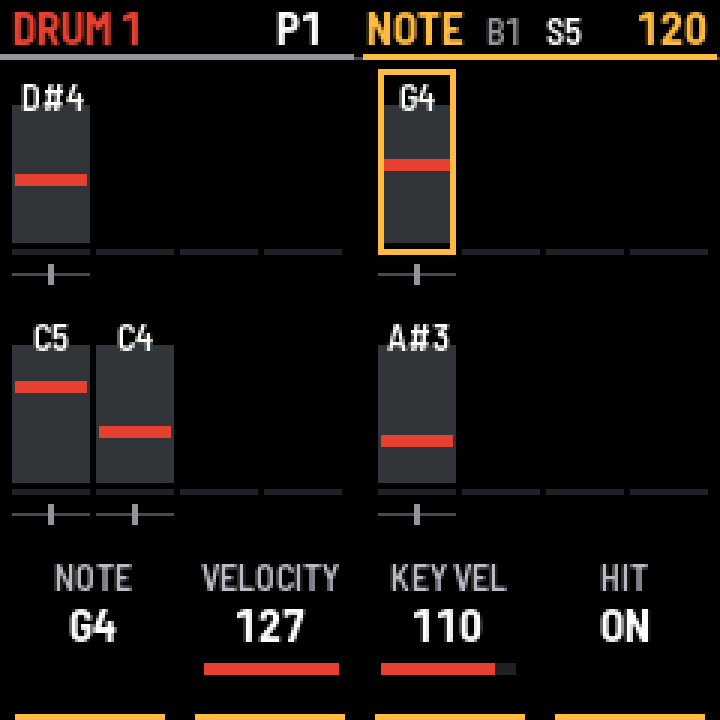
Tap SEQ again for NOTE: the same grid and the same selected step, showing each step's note as a mark, with its velocity as a grey bar behind it. All 27 keys play the voice from F3 to G5.
With REC off a key sets the selected step, turning it on if it was off, and stays there so you can try another. A step that is on keeps its velocity and chance, and its lit key clears it. Hold SEL to only listen. With REC on they write: stopped, step by step from the selected step, and running, live.
- K1
- The step's note.
- K2
- The step's velocity.
- K3
- How hard the keys write.
- K4
- The step on or off.
NOTE carries on over EDIT, ENV and LFO, so the keys play the voice while the dials tune it. HOME ends it, and SEQ brings it back.
A note is an offset from the kit's tuning. C4 means the kit's own pitch, not concert C4.
Lanes
- SEL or a voice's black key held
- After a moment, the top bar shows that lane's length. The keys in the lane glow, the last step is lit, and keys past the end are off.
- Then a white key
- That step becomes the lane's last, for polyrhythms. A black key plays its voice as you hold it, so use SEL to stay silent. While recording, only SEL does this.
- SEL held, OCT+ or OCT-
- A bar more or less on the selected lane. A new bar starts as a copy of the one before, with its locks and recurrence. A bar that still has steps from when the lane was longer stays as it was.
- SEL and EDIT, held a second
- Clears the lane.
Tap ARP for the selected lane's bars, with the white keys still its steps. Tapped again it moves on through three screens: LANE, EUCLID and VEL SHAPE.
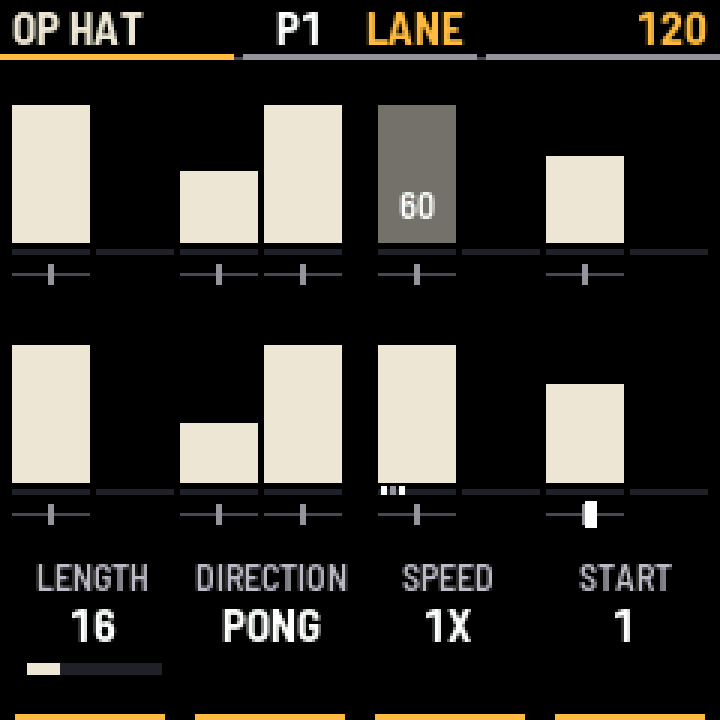
LANE
- K1
- The lane's length, 1 to 64. No step changes, so twelve-step lanes give you 12/8.
- K2
- Direction: forward, reverse, ping-pong, bounce or random.
- K3
- Speed: 1X, 1/2 or 1/4.
- K4
- START, the step a pass begins from. The lane plays round from there, and no step moves.
- ALGORITHM
- A nudge for the whole lane.
A direction changes the order of the steps within a pass, and passes start and end where they would going forward. Ping-pong turns at the end of each pass, so each end step plays twice and the lane stays on the bar. Bounce turns on the end steps, so a 16 step lane takes 30 steps there and back and drifts against the others. Random plays every step once a pass, in a new order each time.
A pattern's length is its longest lane in steps at 1X, whatever the speed. So 16 steps at 1/2 take two bars and carry on across the pattern's repeats, but a pattern change or the next song row won't wait for them. Each pattern saves its own lanes' direction, speed and start.
EUCLID
K1 to K3 are the Euclidean length, hits and rotation. A turn rewrites which of the lane's steps are on, and sets its length. Velocity, locks and other settings stay on their steps. K4 puts the lane back as it was before the first turn. That works once, on the last lane you changed.
Morph
Morph blends the kit towards a second kit from the bank, with one dial. The kit itself doesn't change: the dials still show it and SAVE still writes it.
- POLY held, PRESET
- The tenth black key, printed POLY. Picks the kit to morph to, from NONE through the bank. The top bar says
MORPH TOand its name. - ALGORITHM
- How far it goes. With steps on screen, in the bars view and NOTE, this dial stays the nudge.
- CC 1 on channel 1
- The same, for a mod wheel or a DAW's automation.
Every sound parameter blends, so a wave or filter type steps through the ones between the two kits. An FX's type changes half way across. LFO and velocity targets and FX sends stay the kit's. Each pattern saves its second kit and how far it goes, so a song can move between them. While a second kit is set, HOME shows the two names with a crossfader between them.
To keep a sound from between two kits, press SAVE and turn K4 to BLEND. LFO and velocity targets come from the first kit.
Velocity shapes
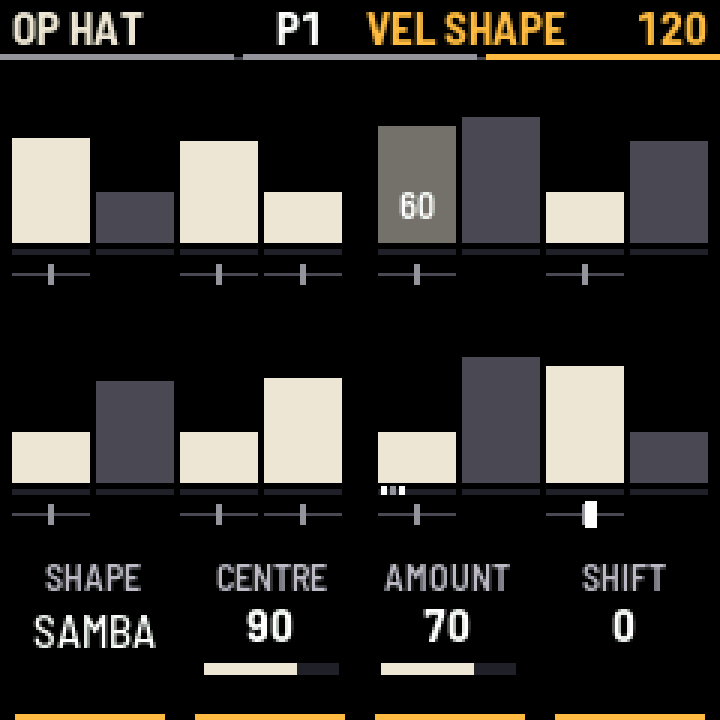
The third ARP screen, VEL SHAPE, is the velocity page. It writes a rhythm's accents into the selected lane's steps. The steps then hold those velocities, so they save and copy like any others, and you can edit any step by hand afterwards. Empty steps get a value too, so a step you add fits the shape.
- K1
- The shape, or OFF to put back the velocities from before you started. That works once, on the last lane you shaped.
- K2
- The centre the accents swing around.
- K3
- How far they swing.
- K4
- Moves the shape later, step by step.
Each turn writes the whole lane again, so it replaces hand edits. The black keys pick the voice, and OCT shows the other bars.
- METER, PHRASE
- Strong and weak beats of a 16 step bar.
- SAMBA, PAILA, MARCHA, BOSSA
- 16 steps.
- CASCARA, SON, RUMBA
- 16 step patterns: the stick pattern, and the 3-2 son and rumba claves.
- MARTILLO, TUMBAO
- 8 steps, for a bongo or conga line.
- BEMBE
- 12 steps, the bell of a 12/8 bar. Give the lane a length of 12.
Patterns, chains and the song
- SEQ held, one white key
- Pattern 1 to 16. While running it changes when the longest lane reaches its end, counted at 1X. Let go of SEQ before picking the next pattern, because a second key while SEQ stays held makes a chain.
- SEQ held, several white keys
- A chain, which loops until you pick one pattern. A chain isn't saved.
- SEQ held, ARP
- The song, up to 63 rows of one pattern each. White keys fill the rows. K1 is the row, K2 its pattern or the end, K3 stop or loop, and K4 turns the song on or off. Picking one pattern turns the song off and keeps its rows.
- COPY on the SONG page
- While a chain plays, a tap writes it over the rows from the selected one. The song's end and any rows after the chain stay.
A row plays its pattern once, so a repeat is a second row. Rows can't be inserted or deleted yet.
Sound pages
EDIT, ENV and LFO show three rows of four. The dials work the middle row, and holding OCT- or OCT+ brings the lower or upper row onto them. EDIT has a second screen.
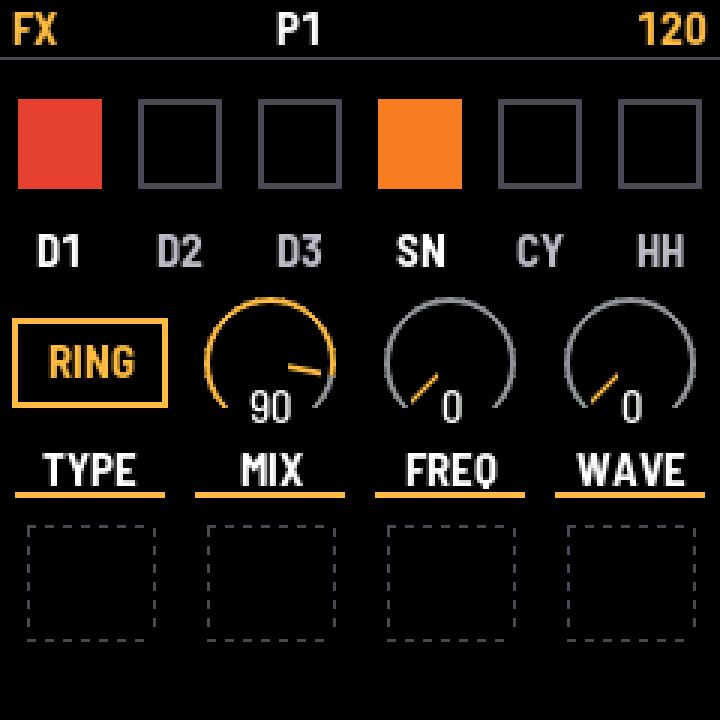
FX has the sends, lit by the black keys, then the FX type, mix and two settings of that type. Hold OCT- for the rest.
GLO has tempo, shuffle, external MIDI clock, roll rate, and the CPU, PEAK and XRUN readings. With OCT- held, two more dials change the sound of everything, and the last one sets what the black keys do:
- K2, RATE
- Lowers every voice's sample rate, before the FX, so delay and distortion stay clean. The kit saves it.
- K3, BITS
- Lowers the bit depth of the final mix, from 16 bits to 2, after the FX. Tails break into steps and cut to silence, and loud hits stay fairly intact. The pattern saves it.
- K4, PREVIEW
- Sets whether the first seven black keys play their voice when pressed. Off, they only select it, except while REC is on. SAVE keeps it.
FX runs one effect at a time: distortion, ring modulator, compressor, delay or reverb. The delay's MODE picks normal or ping-pong, each free or in sync. In sync, TIME picks a fraction of the bar from 1/32 to 1/2, including dotted ones, and follows the tempo. The buffer holds about 0.74 seconds, or half that in ping-pong, so long fractions at slow tempos stop there. Picking the reverb starts its dials from a setting for drums. Its MIX is its level, added to the dry sound, which stays as it is. PRE is its pre-delay, DECAY its length, which rings for good at the top, E/L MIX the balance from early reflections on the left to the late tail on the right, and LOW CUT and HIGH CUT take 24 dB an octave off each end of it, set in hertz. The reverb is the heaviest of them on the CPU, so watch PEAK on GLO.
The LXR has this reverb in its code but leaves it switched off. Tack turns it on and changes it. It is stereo, where the code had one output for both sides. Fixes to its delay lines and a slow movement inside the loop take out the flutter and growl of the tail. LOW CUT and HIGH CUT are new, and MIX adds to the dry sound in place of the crossfade the other FX use. It is also built to use less CPU than the LXR's code did on this chip.
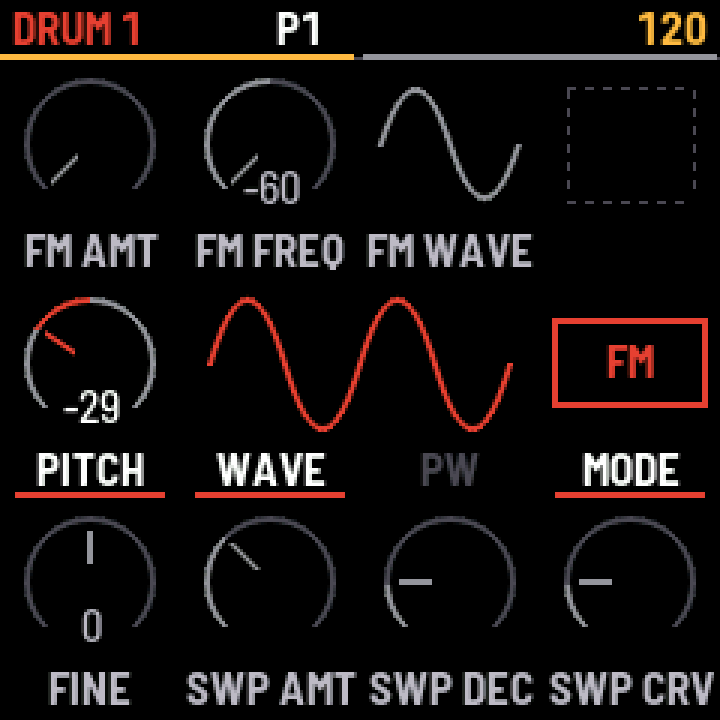
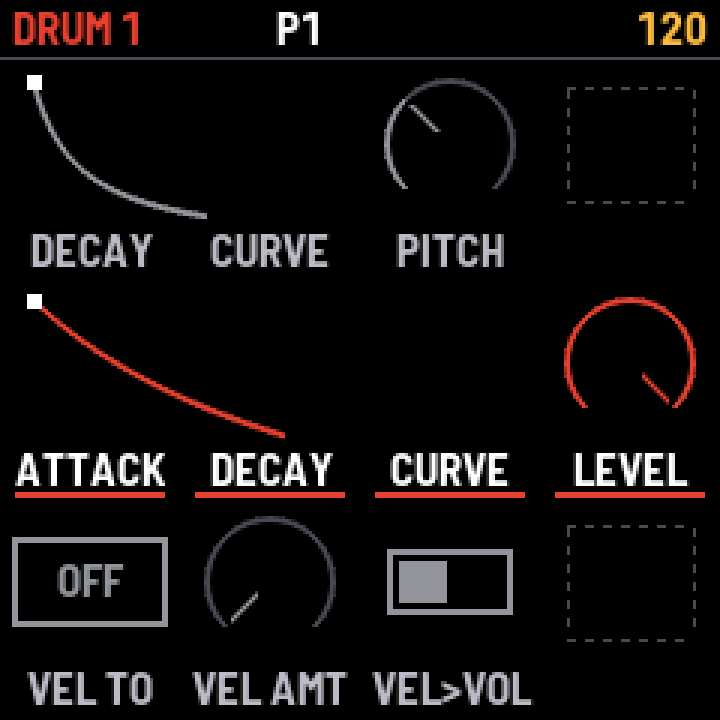
Each voice has its own LFO, and its target can be a parameter of any voice. With SYNC off, FREQ is a rate. With it on, FREQ picks a fraction of the bar, from 4/1 to 1/32. Switching either way jumps to the nearest speed at the current tempo.
With ONCE on, the LFO plays start to end each time RETRIG's voice fires, then leaves its target where you set it. If RETRIG is off, it takes its own voice. A rising wave dips the target and recovers, so SAW UP on a volume or on FX MIX ducks it, with FREQ setting how long. A falling wave rises and returns, which makes an extra envelope for any parameter.
A random LFO with RETRIG on takes a new value each time that voice fires, and holds it until the next hit. At the lowest FREQ it changes only on hits, so a small AMOUNT varies each hit a little.
Kits
No kits come with Tack, because kits belong to the people who made them. Tack reads the .SND files an LXR-02 writes to its SD card, and the Tack plugin writes the same files. Save from the full Tack plugin: a single-voice plugin saves only its own voice. Erica Synths publishes kit packs for the LXR-02, and third parties sell others.
PRESET copies a kit from the bank into the pattern, and on pages other than HOME the top bar names it for a moment. From then on the pattern keeps its own copy, with your edits and its name, and SAVE stores it with the pattern. The sound comes back with the pattern, and changing the bank doesn't change it. SEL and HOME held a second goes back to the kit as it is in the bank.
One turn back from the bank's first kit is the init kit, a clean start. It is built into the firmware and is in no slot, so nothing overwrites it: SAVE puts a kit made from it in a free slot.
SEL held with PRESET mutates the whole kit, and SEL held with ALGORITHM mutates the selected voice. Each click forward is a small random change on top of the last, and turning back retraces the same path to where you started, up to 99 steps. Volume, pan, routing, modulation targets, filter type and the FX stay as they are. A wave changes only now and then. Any other edit starts a new walk from there, and SAVE keeps the result like any other edit.
A new pattern with no steps plays on with the sound that's playing, and keeps it once you add steps or edit it. A copied pattern takes the sound with it.
SAVE opens one page, and K4 picks what it saves. K1 or SELECT picks the slot. A second SAVE writes it, with the sequencer stopped, and any page button leaves without writing.
- PTRN
- On the pattern's own slot, saves every changed pattern with its kit, the song and the tempo. On another slot, which the white keys also pick, it's save as: the pattern and its kit go there, and you carry on there.
- BLEND
- With morph above 0, saves what you hear as a new kit in the bank. The pattern stays on its two kits.
- KIT
- Saves the kit to the bank, starting on its own slot if it came from there. A slot in use shows the name you would replace, and an empty one shows the kit's. K2 moves the cursor along the name and K3 changes the letter. OCT- clears the name and OCT+ picks a random one. Once you change the name, picking another slot keeps it. A kit can't be saved without a name.
The kit bank page replaces the bank with up to 128 kits from .SND files, a folder or a .zip, and saves the bank to a .zip. It works in Chrome or Edge.
MIDI and clock
On MIDI channel 1, notes 60 to 66 play the voices. Notes 0 to 15 and Program Change 0 to 15 pick a pattern.
Turn on external clock on GLO to follow MIDI Beat Clock over USB. Tack takes Start, Stop and Continue, so PLAY does nothing and says so. It ignores MIDI Time Code and Song Position Pointer, so a DAW that starts mid-bar isn't followed to its position.
Tack runs its own clock, locked to the pulses, so jitter on the pulses doesn't reach the steps. The lock takes 12 pulses, and a gap of three pulses or more starts it again.
MIDI out is USB only. Notes that arrive go back out on the voice's channel, so a DAW track that sends Tack its own output plays voices twice.
USB audio
Every power-on is stereo. GLO with OCT- held switches USB audio, with the sequencer stopped:
Audio is 44.1 kHz only. The engine runs at exactly that rate on the FM-1, where the LXR-02 and the Tack plugin run at 44,140 Hz. Its pitches and times follow the rate it is built for, and renders of the factory kits match the plugin's as closely as two renders of the same sound do, apart from a slightly different top end above 16 kHz.
Switching re-enumerates the FM-1, so USB MIDI goes for a moment and a DAW can lose its links. Switch before starting the DAW's audio engine. With no host after 8 seconds it goes back to stereo. On GLO with OCT+ held, DROPS counts lost packets, and each one is a click.
Saving on the FM-1 while it streams USB audio is experimental. On some computers the save interrupts the stream, the recording then stays garbled, and it recovers only when the recording application restarts. Stop recording before you save.
Updating and going back
The install page updates Tack over USB from Chrome or Edge. Back up first on the backup page. A backup holds the patterns, the song, the settings and the startup kit, but not the kit bank, which the kit bank page saves.
The install page's last section writes M-VAVE's firmware back. Saved patterns and kits can be lost in that step.
Troubleshooting
- The black keys don't pick voices
- In NOTE and on the sound pages reached from it, the keys are notes. Press HOME, or hold SEQ and press the black key.
- SAVE says STOP FIRST
- Stop the sequencer. Saving stops the sound for a moment, so it doesn't run during playback.
- The installer doesn't find the FM-1
- Use Chrome or Edge, allow MIDI when asked, use a data cable straight into the computer, and close anything else using the FM-1's MIDI port.
- The FM-1 doesn't start after an install
- After two failed starts it waits in the chip's own update mode. fm1_rescue puts stock firmware back from a Mac or Linux computer. Then install again.
- A DAW loses the FM-1 after a save in 10 channel mode
- Saving during a stream can stall USB audio. Save while the stream is stopped, or restart the DAW's audio engine.
03 / STATUS
Status
What is tested, and what to expect.
Tack 0.9 is a beta. It has run on one FM-1, so expect rough edges, and expect the panel to change between versions. Patterns saved in one version may not load in the next.
- Run on a real FM-1
- Installing and updating over a unit that came from V15, and going from Tack back to V15 and returning. Sound, saving, a power cycle, kit upload and switching, backup and restore, stereo and 10 channel USB audio, following a DAW's MIDI clock, NOTE, chains and the song.
- Not tested
- Installing on an FM-1 with M-VAVE's V16 bootloader. A long playing run. TRS MIDI, hat choke and MIDI out from the sequencer.
04 / CREDITS
Credits
Tack is Swedish for Thank you.
Tack's engine and sequencer are the LXR firmware by Erica Synths and Sonic Potions, under GPL-3.0. It is built on fm1-base and felucca-bsp, from Felucca by Leo Kuroshita, with work by Charles Vestal. USB audio's 10 channels follow Acid Moogi by Tom Perez. The BEMBE shape comes from the Groove MIDI Dataset by Gillick, Roberts, Engel, Eck and Bamman, under CC BY 4.0.
LXR and Erica Synths are trademarks of Erica Synths. M-VAVE and FM-1 are trademarks of their respective owners. Tack is modified firmware and is not affiliated with either.
Tack comes with no warranty. Replacing a device's firmware is at your own risk.