Public beta
TACK PLUGIN
A digital drum synth for your DAW.
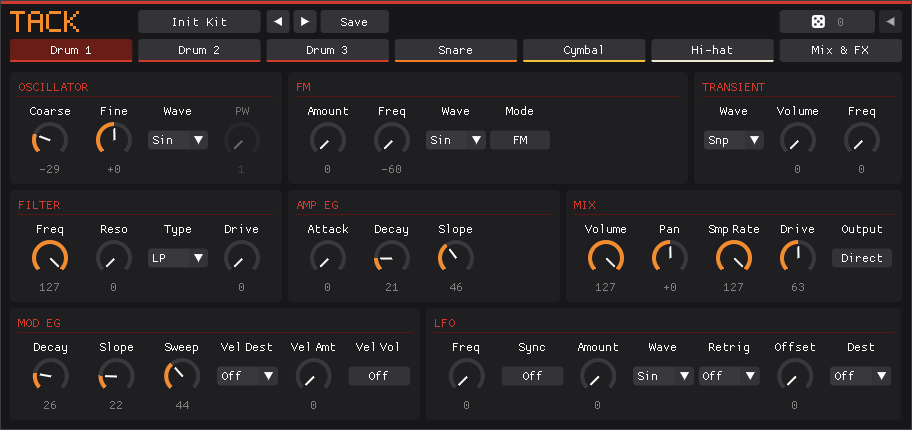
Seven synthesised drum voices with 227 parameters to automate, seven stereo outputs, and an editor. CLAP, VST3 and Audio Unit.
01 / EXPLORE
Start here
Tack runs the sound engine of the LXR-02 drum machine as a plugin. The engine is the firmware's code, changed only by a few bug fixes. The plugins, the editor and the code that runs the engine on a computer are new. There is no sequencer, because your DAW has one.
In Tack, notes on MIDI channel 1 from C3 up trigger the voices, one note each. Channels 2 to 8 each play one voice chromatically.
Want the sequencer on hardware? Tack for the FM-1 is the same engine as firmware.
02 / REFERENCE
Manual
The plugins, kits, installing and building from source.
The plugins
Each format holds the same five plugins.
- Tack
- The whole kit: three drums, snare, cymbal, closed and open hi-hat, and the FX bus. It has seven stereo outputs, Main and one each for the three drums, snare, cymbal and hi-hat.
- Tack Drum
- One drum voice.
- Tack Snare
- The snare.
- Tack Cymbal
- The cymbal.
- Tack Hi-hat
- The closed and open hi-hat.
Every sound parameter on the device's front panel is a plugin parameter, 227 in Tack, and the host can automate and modulate them. The single-voice plugins play chromatically on any channel, or at the voice's tuned pitch when their Chromatic switch is off.
Sample rate and latency
The engine always runs at 44,140 Hz, the LXR-02's own rate, as its clock can't make 44.1 kHz exactly. Its filters, envelopes, delay and reverb are set in samples at that rate, so running it faster or slower would change the sound. Tack resamples its output to the host's rate instead, even when that is 44.1 kHz, so a kit sounds the same at any project rate.
That costs a constant 5.8 ms of latency, which Tack reports so the host can compensate. A note or a parameter change lands within 0.73 ms of its place, as the engine computes envelopes and LFOs once per 64-sample block, like the device does.
The resampler is libsamplerate at medium quality. What it adds is about 97 dB below the signal, far too quiet to hear, and in a 44.1 kHz project it rolls off gently above about 20 kHz. The aliasing you can hear in Tack comes from the engine's own oscillators and distortion, the same as on the LXR-02, and resampling neither adds to it nor removes it.
Running the engine at the host's rate would change the kits. Envelopes and LFOs step a fixed amount each sample, the transients are recordings 50 ms long at 44.1 kHz, and the delay and reverb count their lengths in samples. At 96 kHz the oscillators would also alias differently, and that aliasing is part of how the kits sound.
Kits
Tack loads .SND kit files. Put folders of kits in the kit folder, where each folder is a pack. No kits come with Tack.
- Linux
~/.local/share/Tack/Kits/- macOS and Windows
Documents/Tack/Kits
Save writes a .SND file to the User pack. A single-voice plugin saves a kit with only its voice in it, and Tack's browser marks such files with the kind of voice. Picking one replaces only that voice of the open kit.
The die makes a small random change to the open tab's voice, and Shift-click changes every voice. Each click goes on from the last, and the arrow beside it retraces the same steps to where you started. Volume, pan, routing, modulation targets, filter type and the FX stay as they are. A single-voice plugin's die changes its voice.
Installing
Download the zip for your platform from the latest release: Linux x86-64, Windows x86-64 or macOS, for Apple silicon and Intel alike. Each holds Tack.clap and Tack.vst3, and on macOS also Tack.component. Copy them to your plugin folders: ~/.clap and ~/.vst3 on Linux, C:\Program Files\Common Files\CLAP and VST3 on Windows, and ~/Library/Audio/Plug-Ins/CLAP, VST3 and Components on macOS.
The macOS build is not signed, so macOS blocks it as downloaded. After copying, clear the download flag in Terminal: xattr -dr com.apple.quarantine ~/Library/Audio/Plug-Ins.
Building
To build Tack from source instead, you need CMake 3.21 or newer, Ninja, a C and C++ compiler and the OpenGL and X11 development files.
cmake -S host -B build/host -G Ninja
cmake --build build/host
cmake --build build/host --target install_tack
The last command copies Tack.clap to ~/.clap and Tack.vst3 to ~/.vst3. The repository has the commands for Windows and macOS.
03 / STATUS
Status
What is tested.
Tack 0.9 is a beta, and projects saved with it may not load in later versions.
- Linux x86-64
- CLAP and VST3 tested in Bitwig 6.1.6.
- Apple silicon Mac
- CLAP and VST3 tested in Bitwig 6.1.6, and the Audio Unit in Logic Pro.
- Windows
- Builds, and renders the same as Linux under Wine. Nobody has played it in a DAW yet.
04 / CREDITS
Credits
Tack is Swedish for Thank you.
Tack's engine and sequencer are the LXR firmware by Erica Synths and Sonic Potions, under GPL-3.0. It is built on fm1-base and felucca-bsp, from Felucca by Leo Kuroshita, with work by Charles Vestal. USB audio's 10 channels follow Acid Moogi by Tom Perez. The BEMBE shape comes from the Groove MIDI Dataset by Gillick, Roberts, Engel, Eck and Bamman, under CC BY 4.0.
LXR and Erica Synths are trademarks of Erica Synths. M-VAVE and FM-1 are trademarks of their respective owners. Tack is modified firmware and is not affiliated with either.
Tack comes with no warranty. Replacing a device's firmware is at your own risk.