WOW / MANUAL
Wow
Manual
Start here
Put Wow on a sustained chord, a melody or a sample, then bring up Amount until you hear the pitch move. Start with slow Wow for a gentle warble. Blend towards Flutter for faster movement, and add Drift to make the motion less predictable.
Try it subtly first. A little movement can change the feel of a steady sound; a larger Amount makes the pitch modulation an audible part of the performance. HQ is the default quality setting, so you can start listening without changing it.
Main controls
- Wow Rate
- Sets the slow oscillator from 0.1 to 4 Hz, or an in-range beat division when synced.
- Flutter Rate
- Sets the fast oscillator from 6 to 30 Hz, or an in-range beat division when synced.
- Wow / Flutter
- Blends the two LFOs with constant power. Move the slider toward WOW for more Wow, or toward FLUTTER for more Flutter. The host shows the Wow and Flutter shares in that order, such as 90/10.
- Amount
- Sets the total pitch movement.
- Drift
- Adds repeatable, smoothly changing variation to both LFO rates.
- Phase
- Rotates both oscillators through a full cycle. Drag the dial or its degree value; hold Shift for fine adjustment. The blue pointer shows the common phase offset. It wraps through zero, with smooth automation along the shortest circular path. Fast phase changes can still produce pitch movement.
- Stereo spread
- The paired-circle symbol beneath Phase controls left/right separation, from 0° to 180°. Drag its orange degree value or Alt-drag the Phase dial. Shift gives fine adjustment. The orange arc shows the spread centred on the phase pointer and wraps through zero. At zero spread, the channels stay linked.
Tempo sync
Click Hz or the quarter-note symbol beside either rate to switch that oscillator independently between free speed and host-tempo sync. Switching to sync selects the nearest beat division within its range. Switching back keeps the equivalent Hz speed.
Synced divisions occupy their equivalent Hz positions on the knob. D means dotted and T means triplet. Hover over a synced knob to see its Hz rate. If a tempo change takes the chosen division outside the oscillator's range, Wow plays and displays the nearest in-range division until the chosen one fits again.
Synced oscillators follow the song beat position when playback starts, loops or seeks, and when you enable sync or change a division during playback. Phase adjusts their position within the cycle. Drift adds variation around that reference; set it to zero to stay on the beat grid after the transition settles.
Free-Hz oscillators keep running independently, and modulation continues while transport is stopped. Without song position, sync follows tempo without resetting phase. Without a valid tempo, Wow keeps the last valid tempo, initially 120 BPM.
Quality
HQ is the default. Normal, HQ, and Ultra all use rate-aware windowed-sinc readers with progressively tighter spectral accuracy. Draft uses a lower-cost cubic interpolator for comparison.
Pitch range and latency
Rate-scaled keeps delay excursion bounded, so faster modulation produces more pitch movement. At 48 kHz it reports about 8.0 ms latency.
Constant keeps the perceived pitch range more consistent across oscillator rates. At 48 kHz it reports about 34.2 ms latency.
The host is responsible for latency compensation. Changing Pitch Range can make the host restart processing.
FAQ
- How do I change the interface size?
- Click OIKO AUDIO in the top row of the plug-in, then choose an Interface Scale value from 50% to 200%. Drag the bottom-right corner to choose a size from 50% to 200% in 25% steps. Release to resize the window, or press Escape to cancel. The plug-in remembers your chosen size.
- Where do I install it?
- Copy the formats you use into their matching folders, restart the DAW, then rescan plugins.macOS
~/Library/Audio/Plug-Ins/CLAP~/Library/Audio/Plug-Ins/VST3WindowsC:\Program Files\Common Files\CLAPC:\Program Files\Common Files\VST3Linux~/.clap~/.vst3 - Are the beta builds signed or notarized?
- No. The current builds are not signed for distribution, and the macOS builds are not notarized. macOS and Windows may ask you to allow the plugin before the host can scan it.
Why clean modulation matters
Pitch modulation changes the speed at which stored audio is read. Most requested read positions land between samples, so the plug-in has to reconstruct values that were never recorded directly. That reconstruction method has a large effect on the output.
The interpolation problem
A simple interpolator is inexpensive, but it can lose high-frequency level and create tones unrelated to the requested pitch movement. When playback speeds up, frequencies near the top of the input spectrum can be pushed beyond the output Nyquist limit. If they are not removed before resampling, they fold back into the audible band as aliasing, an implementation artifact.
Those errors are tonally unrelated to the sidebands produced by pitch modulation itself. Frequency modulation naturally creates related components around the original tone. Those are part of the effect.
What Wow does
Normal, HQ, and Ultra use polyphase windowed-sinc fractional-delay readers. Their low-pass cutoff follows the instantaneous playback rate: around normal speed, nearly the full input band is retained; as the read rate rises, the cutoff moves down far enough to stop content crossing the output Nyquist limit.
The filter banks are prepared away from the real-time audio thread and interpolated smoothly during processing. Normal uses 80 taps, HQ uses 96, and Ultra uses 128. The increasing tap count tightens spectral accuracy at a higher processing cost. Draft deliberately uses a simpler cubic interpolator.
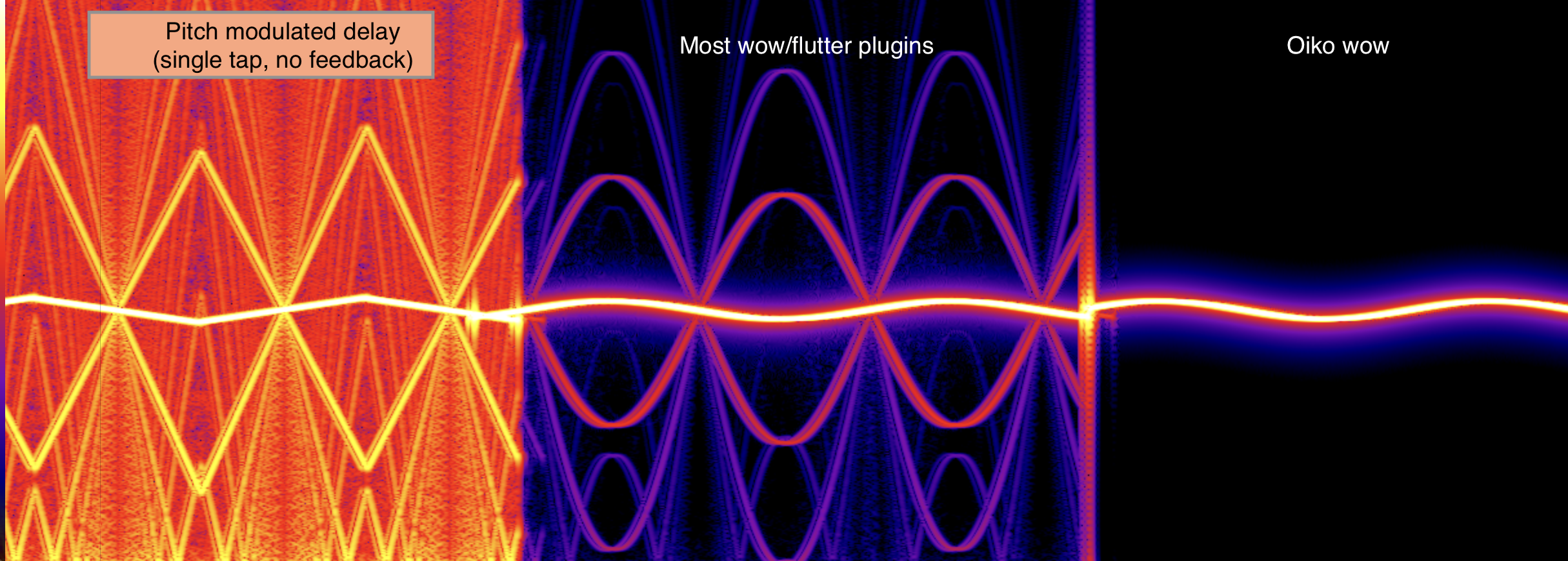
Reading the comparison
The bright central curve is the modulated test tone. The additional arcs and haze around it show energy created by the resampling process. The unfiltered delay folds substantial energy through the spectrum. The middle examples reduce that energy but retain repeated spurs. Wow keeps the intended moving tone and its physically correct modulation sidebands while suppressing the unrelated structure.
The difference is easiest to hear on exposed high frequencies, extreme settings, and layered modulated signals. On darker or dense material it may be subtle, but clean resampling prevents the artifacts from accumulating.